If you happen to run into any sort of system error, or some application is not working properly within Fedora just check on the aggregated log file with the following command:
tail -F /var/log/messages
01 September 2010

31 August 2010
Easy file transfer
- SCP
scp /home/xxx/middleware/jon-server/test.txt root@192.168.100.150:/app/jon/bin
- KDE - Dolphin
fish://root@192.168.100.150/app/jon
30 August 2010

29 August 2010
Writing start scripts for services in Fedora linux
Howto manage your services and programs within Fedora
Example:

1. Make your shell script executable
All shell scripts in /usr/bin/ or /sbin/ can be executed anywhere within the command line
Add a softlink into /sbin or /usr/bin
$ cd /sbin
$ ln -s /app/jon/bin/rhq-server.sh jon
$ jon
1.5. Start your shell script at startup by modifying
Example:
$ sudo vi /etc/rc.d/rc.local
add:
killall -9 knetworkmanager & qdbus org.kde.kded /kded unloadModule networkmanagement && nm-applet &
2. Start your program easily via shell script
If you have a shell that takes the standard arguments : start / stop / restart
you can it into the repository /etc/init.d/.
All scripts in /etc/init.d/ can be called with
$ service my_script start
For convenience use a softlink instead of copying it into /etc/init.d:
$ cd /etc/init.d
$ ln -s /app/jon/bin/rhq-server.sh jon
$ service jon start
3. Service registry within Fedora (the startup services)
List all available services (/etc/init.d)
$ chkconfig --list
Start / stop the ssh daemon service
$ chkconfig sshd start (or stop)
Enable a service
$ chkconfig --add ssh
$ chkconfig sshd on
Disable a service
$ chkconfig sshd off
$ chkconfig sshd --del
If you you prefer a graphical interface for the service registry use
$ system-config-services

4. Making an executable 'servicable'
Create a file in /etc/init.d, here an example: shutter
#!/bin/sh
#
# shutter This script starts and stops the shutter daemon
#
# chkconfig: - 78 30
# processname: shutter
# description: shutter is a daemon process
get_shutter_pid () {
SHUTTERPID=$( ps aux --cols 1024 | grep "perl" | grep "/usr/bin/shutter" | awk '{ print $2 }' | head -n 1 )
}
PIDFILE=/var/run/shutter.pid
# By default it's all good
RETVAL=0
BASE="/usr/bin"
# See how we were called.
case "$1" in
start)
# Start daemon.
echo -n $"Starting shutter: "
export DISPLAY=:0
nohup ${BASE}/shutter > /dev/null &
sleep 1
get_shutter_pid
echo -n ${SHUTTERPID} > ${PIDFILE}
echo "Start Shutter : pid = ${SHUTTERPID}"
;;
stop)
# Stop daemons.
get_shutter_pid
if ! [ -z "${SHUTTERPID}" ] ; then
echo "Stop Shutter : pid = ${SHUTTERPID}"
kill "${SHUTTERPID}"
fi
;;
restart|force-reload)
$0 stop
sleep 8
$0 start
;;
status)
get_shutter_pid
if [ -z "${SHUTTERPID}" ] ; then
echo "Shutter is stopped"
exit 1
else
echo "Shutter (pid ${SHUTTERPID}) is being executed..."
exit 0
fi
;;
*)
echo "Usage: $0 {start|stop|restart|status}"
RETVAL=1
;;
esac
exit $RETVAL
27 August 2010
Howto use JBoss Operation Network (JON) for your provisioning
Post summary:
This post will illustrate how you can set up a Red Hat middleware provisioning environment using Linux (Fedora), KVM (virtualisation), JBoss EAP (application server) and JBoss Operations Network (supervision) and Apache httpd (mod_cluster).
A use case could be : JON detects that the an application deployed on EAP can not handle the charge any more and triggers the creation of a new virtual machine that contains a new JBoss EAP. Via a bundle the application is deployed in EAP who joins the cluster.

Main post :
Here I more or less dumped the technical steps to follow without explaining step by steps (as it's a long post use ctrl+F to be happy)
On host:
- sudo service sshd start
- cd /app/script
- ./initSshId.sh (removing the file /etc/.ssh/know_hosts might be necessary)
- Creation of a soft link for your script from the JON/bin directory to the script directory. As you can see in the next screen shot, this will allow
JON to discover automatically those scripts (without soft link you would need a plugin)
cd /app/jon/jon-server/bin
ln -s /app/script/virsh-start.sh virsh-start.sh

26 August 2010
KDE vs Gnome
Summary:
Having the Gnome desktop you want to try the KDE desktop (or vice versa)
Main post:
Having the Gnome desktop you want to try the KDE desktop (or vice versa)
Main post:
- Download the kde packages
sudo yum install kdm (this is only the startup manager)
sudo yum install kde - Setting KDM as startup manager
su -
echo "DISPLAYMANAGER=KDE" > /etc/sysconfig/desktop - Choose your desktop environment
switchdesk (switch from Gnome to KDE desk within your session) - Kill your XServer from console
in Gnome:
cd /etc/init.d/
sudo gdm-stop
in KDE:
init 3 - Start your XServer
xstart
Disable SELinux on Fedora 13
- Edit the following file:
sudo vi /etc/selinux/config - Replace
SELINUX=enforcing with SELINUX=disabled
- Stop X server
telinit 3 (or within gnome gdm restart)
- Start X server
telinit 5
24 August 2010
My useful Linux commands
Some Linux commands I find useful:
Replace a string in all files recursively usind sed ( replaces repository.jboss.com with anonsvn.jboss.org/repos/repository.jboss.org)
Add launchers (*.desktop, icon - comment - name) here
/usr/share/applications
Find out which kernel you are using
uname -r
Find string "proxy" in all files
sudo find . -type f -name "*" -exec grep -l "proxy" {} \;
grep -r 'proxy' *
Making a script executable
chmod +x
Finding all my files with string "myfile" including soft link references directories
find . -user me -name *myfile* -follow
Displaying directory structure
ls -rtl bbb (-R subdirectories)
Monitoring changes within a file
tail -100 fichier
tail -f file (monitoring)
grep -F ‘abc efg’ (Leerstelle = OR)
grep -i -n (line number) testChar file.txt
cat fichier | grep blub
Displays full path of file being executed
which java
grep valopurgesolde.x communs/ces/x (pour voir qu’est-ce que le processus fait)
kill -9 -1 (killt das zuletzt angemeldete Konto)
cd - (go to root)
du -sk . (Wie viel Speicherplatz belegt)
df -k (kilo) . (combien il reste sur le filesystem)
ps -u valqua11 (kill -9 #1 #2)
ln -s link name (ln -s ${HOME}/brackmann roli)
Displaying all exports of the shell
typeset
Process keeps on running in background even when the executing shell is killed
nohup your_command
cat server.log | awk '{ print $4; }' | sort -u > server4thcolumndistinct.log
Deletes all temporary files followed by '~'
find ./ -name '*~' | xargs rm
Replace a string in all files recursively usind sed ( replaces repository.jboss.com with anonsvn.jboss.org/repos/repository.jboss.org)
grep -rl repository.jboss.com . | xargs sed -i 's/repository.jboss.com/anonsvn.jboss.org\/repos\/repository.jboss.org/'
Add launchers (*.desktop, icon - comment - name) here
/usr/share/applications
Find a file on the file system
updatedblocate test.xml
Find out which kernel you are using
uname -r
Find string "proxy" in all files
sudo find . -type f -name "*" -exec grep -l "proxy" {} \;
find . -name "*" -exec grep "proxy" {} \; (donne tous les lignes avec Test_1)
find . -name "*" -exec grep -l "proxy" {} \ ; (donne tous les fichiers avec Test)
grep -r 'proxy' *
Making a script executable
chmod +x
Finding all my files with string "myfile" including soft link references directories
find . -user me -name *myfile* -follow
Displaying directory structure
ls -rtl bbb (-R subdirectories)
Monitoring changes within a file
tail -100 fichier
tail -f file (monitoring)
grep -F ‘abc efg’ (Leerstelle = OR)
grep -i -n (line number) testChar file.txt
grep « VALOTRACE= » `(Alt + Shift + 7) find .`
cat fichier | grep blub
Displays full path of file being executed
which java
grep valopurgesolde.x communs/ces/x (pour voir qu’est-ce que le processus fait)
kill -9 -1 (killt das zuletzt angemeldete Konto)
cd - (go to root)
du -sk . (Wie viel Speicherplatz belegt)
df -k (kilo) . (combien il reste sur le filesystem)
ps -u valqua11 (kill -9 #1 #2)
ln -s link name (ln -s ${HOME}/brackmann roli)
Displaying all exports of the shell
typeset
Process keeps on running in background even when the executing shell is killed
nohup your_command
Gets the 4th columns of the server.log and deletes all the doubles
cat server.log | awk '{ print $4; }' | sort -u > server4thcolumndistinct.log
Deletes all temporary files followed by '~'
find ./ -name '*~' | xargs rm
19 August 2010
Classloading JBoss
Title : Web app is using embedded jars that exist already within JBoss
Summary:
First of all w
JBoss class loading
A college of mine has written a good article on class loading :
The translated Noel Rocher
Main post
jboss-app.xml <?xml version="1.0" encoding="utf-8"?>
<jboss-app>
<loader-repository>
TestClassloaderJBossLR:loader=TestClassloaderJBoss.ear
<loader-repository-config>java2ParentDelegation=true</loader-repository-config>
</loader-repository>
</jboss-app>
jboss-web.xml
<?xml version="1.0" encoding="utf-8"?>
<jboss-web>
<!-- Mettre toute l'application soit dans le meme classloader (J2EE) -->
<class-loading java2ClassLoadingCompliance="true"/>
</jboss-web>
Ever since version 4.0.2, JBoss is configured according to the J2EE specification, meaning that the default isolation of applications is the research in priority classes in the ClassLoader of the application.
Specifying in the 2-descriptors jboss and jboss-web.xml app.xml attributes and java2ClassLoadingCompliance java2ParentDelegation = true = "true, you change this default behavior and return to as it was in JBoss 3.2, namely the use of a unified ClassLoader taking priority classes loaded first, so in your case those server applications.
fsfdf
16 August 2010
Webservices within JBoss
Summary:
Web services give you the possibility of loosely coupling your different IT-systems. At least on the paper it seems that you can interchange either the client or server easily.
Only after having changed either part for the first time you might realize that a new Web service implementation on one side means redeveloping also the other.
Main post:
When working with the Webservice stack of JBoss you will have to check on the version you are using, as there has been some changes over the years :
http://community.jboss.org/wiki/WebServiceStacks
| Name | File | JBoss Version | Status | Supported API | Based on |
| JbossWS-3.x | JbossWS Native 3.1.2.SP3-patch-02 jbossws.sar | 5.0+ | JEE 6 | JAX-WS | |
| Apache CXF (not shipped with EAP) 3.1.2.SP3 | 5.0+ | Supported | JEE 6 (1) | JAX-WS | |
| GlassFish Metro (not shipped with EAP) | 5.0+ | JEE 6 | JAX-WS | ||
| JBossWS-2.x sources binaries | jbossws.sar (2.0.1.SP2_CPxx) | EAP 4.3 CPxx | ??? | JEE 5 | JAX-WS |
| JBossWS-1.x | jbossws.sar (1.2.1.GA_CPxx+) | EAP 4.2 CPxx | ??? | JEE 5 | JAX-WS (2) |
| JBossWS4EE | jboss-ws4ee.sar | < 4.0.4 | Maintenance Only | J2EE 1.4 | Axis |
| JBoss.NET | jboss-net.sar | 3.2.x | End of Life | Proprietary | Axis |
(1) JDK 1.6 incorporates the JAXB reference implementation. However, it incorporates an old version of the RI. CXF does not support this version. As of 1.6_04, this is easy to deal with: you must put the versions of JAXB RI (the 'impl' and 'xjc' jars) that we include with CXF in your classpath. As of this writing, these are version 2.1.6.
(2) Yes, JAXWS ... are supported all together starting from JBossWS-1.2.0.GA. Link
This table was build upon http://community.jboss.org/wiki/WebServiceStacks, http://community.jboss.org/wiki/JBossWS, http://community.jboss.org/wiki/JBossWS-Installation and notes from Alessio Soldano
Howto log within JBoss
Main point of entry:
http://docs.jboss.org/process-
12 August 2010
Linux /boot partition problem (upgrading Fedora Linux)
Summary:
/boot partition too small when trying to upgrade Fedora 10 to 11, 11 to 12, 12 to 13, 13 to 14
Main article:
When not choosing a big enough /boot partition when setting up you Linux system you might get problems when wanting to upgrade to the next major Fedora release.
Fedora (same with Ubuntu) will tell you that space on /boot is missing.
Don't try lvm (Logic Volume Managment) it won't help you!
You have the following possibilties
1. Delete old kernel updates
package-cleanup --oldkernels
2. Empty trash
du -sh .Trash-0
3.
tune2fs -m 0/dev/sda1
11 August 2010
Thunderbird & Lightning & Google Sync (compatibility 64 bit Linux)
If you run Thunderbird on a 64 bit Linux system you might have tried the calendar add-on "Lightning" and maybe even the synchronization add-on "Provider for Google calendar".
Linux (Ubuntu or Fedora) gets always the newest versions of Thunderbird via it's integrated package manager (Debian = apt-get; Red Hat = yum).
If you have had the problem that "Not compatible with Thunderbird x.x.x" please note that you can help yourself by downloading both add-ons from this special link:
1. Download specific Lightning
http://releases.mozilla.org/pub/mozilla.org/calendar/lightning/releases/1.0b2rc3/contrib/linux-x86_64/lightning.xpi
2. Download specific Provider for Google calendar
http://releases.mozilla.org/pub/mozilla.org/calendar/lightning/releases/1.0b2rc3/contrib/linux-x86_64/gdata-provider.xpi
1.0b2rc3 (change to latest appropriate version)
3. Install downloaded add-ons
Tools
→ Add-ons → Install → Choose the *.xpi → Restart ThunderbirdOther usefull links:
https://wiki.mozilla.org/Calendar:Lightning
https://wiki.mozilla.org/Calendar:GDATA_Provider
Adding CLASSPATH or JAVA_OPTS to JBoss
Summary:
This post shows howto add a new Java library (e.g. patched class) or a new Java startup option
to JBoss running under Linux
Main post:
Adding Java library
edit ./run.sh and add JBOSS_CLASSPATH="./lib/mypatchedJar.jar;$JBOSS_CLASSPATH"
Adding Java startup option
edit ./run.sh and add JAVA_OPTS="-D32 $JAVA_OPTS"
07 August 2010
Howto install JBoss JON Server
Summary:
This is my quick and dirty installation guide for a JON Server and a JON Agent
Main post:
Set up database
- First you need to install a database (Oracle or PostGre are supported)
- yum install postgresql postgresql-server
(when using Fedora Linux, adapt for other distributions)
Configure the new service to start automatically
/sbin/chkconfig postgresql on
service postgresql initdb
change /var/lib/pgsql/data/postgresql.conf
listen_addresses='*'
http://www.postgresql.org/docs/9.0/static/auth-pg-hba-conf.html
/var/lib/pgsql/data/pg_hba.conf
host all all 0.0.0.0/0 trust
service postgresql stop
service postgresql start
- Create a user: rhqadmin (password: rhqadmin)
http://docs.redhat.com/docs/en-US/JBoss_Operations_Network/2.4/html/Installation_Guide/JON_Server_Installation.html
chkconfig iptables off
Installing JON server
Official Red Hat support


Installing the JBoss ON Agent
Official link
This is my quick and dirty installation guide for a JON Server and a JON Agent
Main post:
Set up database
- First you need to install a database (Oracle or PostGre are supported)
- yum install postgresql postgresql-server
(when using Fedora Linux, adapt for other distributions)
Configure the new service to start automatically
/sbin/chkconfig postgresql on
service postgresql initdb
change /var/lib/pgsql/data/postgresql.conf
listen_addresses='*'
http://www.postgresql.org/docs/9.0/static/auth-pg-hba-conf.html
/var/lib/pgsql/data/pg_hba.conf
host all all 0.0.0.0/0 trust
(by default it is only allowed to receive request from localhost:
host all all 127.0.0.1/32 trust)
service postgresql stop
service postgresql start
- Create a user: rhqadmin (password: rhqadmin)
http://docs.redhat.com/docs/en-US/JBoss_Operations_Network/2.4/html/Installation_Guide/JON_Server_Installation.html
cd /var/lib/pgsql/data
Create role rhqadmin:
createuser -h 127.0.0.1 -p 5432 -U postgres -S -D -R rhqadmin
Create db rhq:
createdb -h 127.0.0.1 -p 5432 -U postgres -O rhqadmin rhq
(if you are using another machine to run your DB server make sure your SELinux is disabled)service iptables stop
chkconfig iptables off
Installing JON server
Official Red Hat support
- Unzip the downloaded JON-zip-file
- $ cd /jon-server-2.x.x.GA/bin$ export JAVA_HOME=/usr/java/jdk1.6.0_05 $./rhq-server.sh start Trying to start the RHQ Server... RHQ Server (pid 14413) is starting
- Goto http://localhost:7080/ (and click "Click here to continue the installation")
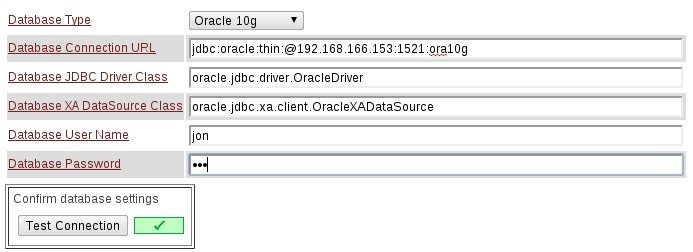 |
| Setting up JON database |
- Click "Install"


 |
| Screenshot of some tables created during installation |
- You will be redirected to http://localhost:7080/Login.do

Login with user rhqadmin (default password is rhqadmin)
Itis not the user/pw of the database!
- A valid JBoss Operations Network license is required to use this software. Please click the Update License link below.

- Get your license here: https://access.redhat.com/jbossnetwork/restricted/softwareDownloadJBNLicense.html
- Click Browse ... and choose the downloaded xml license file. Click OK.

- If you want rather a command line installation than a GUI based installation, you could have entered all data within /bin/rhq-server.properties (use
generate-db-password.shto generate an encrypted password). After that just run JON server : /bin/rhq-server.sh start
Official link
- Get the agent JAR by hitting http://localhost:7080/agentupdate/download
- Save the rhq-enterprise-agent-3.0.0.GA.jar (~ 11 MB) to the directory your agent should be installed to
- Run
java -jar rhq-enterprise-agent-3.0.0.GA.jar --install
which will create a rhq-agent directory - In the directory ./
rhq-agent/bin run
./rhq-agent.sh --cleanconfig
- After the first setup, start your agent with
./rhq-agent.sh
More detailed installation steps you'll find here:
http://amitbhayani.blogspot.com/
http://pilhuhn.blogspot.com/2008/05/writing-rhq-plugin-part-1.html
06 August 2010
The open source problem - "Unfakeable Linux"
Summary:
This post covers the problem of companies that provide open source software
Examples:
Red Hat Enterprise Linux --> CentOS
Red Hat Enterprise Linux --> Oracle Unbreakable Linux
Main post:
Open Source means anyone can take your source and redistribute it, as long as it is not sold.
Furthermore
CentOSOracle
What can comanpanies do?
1. Marketing
Red Hat "Unfakeable Linux" advertisement - smart answer to Oracle's copy of RHEL
05 August 2010
Trying Java 7
Summary:
Being curious weather the new JConsole within JDK7 would still have problems connecting to JBoss JMX (check out older post), I gave a prerelease a shot and tried JDK7.
Main post:
Standard Edition 7 Binary Snapshot Releases
July 29, 2010
Build b103http://dlc.sun.com.edgesuite.net/jdk7/binaries/
Clustering JBoss: mod_jk VS mod_jk2 VS mod_proxy
Load balancing – JBoss Application Servers
| Web Connectors | Apache version | JBoss platforms | Tomcat |
| mod_jk 1.2.x | Apache 2. | EAP4.3 | |
| mod_jk2 | JBoss EAP 4.2 | P2 | |
| mod_proxy | Apache 2.x (included in 2.2+) | EAP3.x | |
| mod_cluster | Apache 2.2.10+ | EAP 5.0.0+ & EWS 1.0+ EAP 3 + 4 (not certified) | Not certified |
Parralel deployment in JBoss
Summary:
Howto hot-deploy a new version V2 of an application V1 without having a downtime of the application.
Main article:
References:
Weblogic
Subscribe to:
Posts (Atom)